
Fitscope Studio
November 2, 2026, 1 min
Senior Exercise Video Production: How Clinician-Designed Programs Become Classes People Can Follow
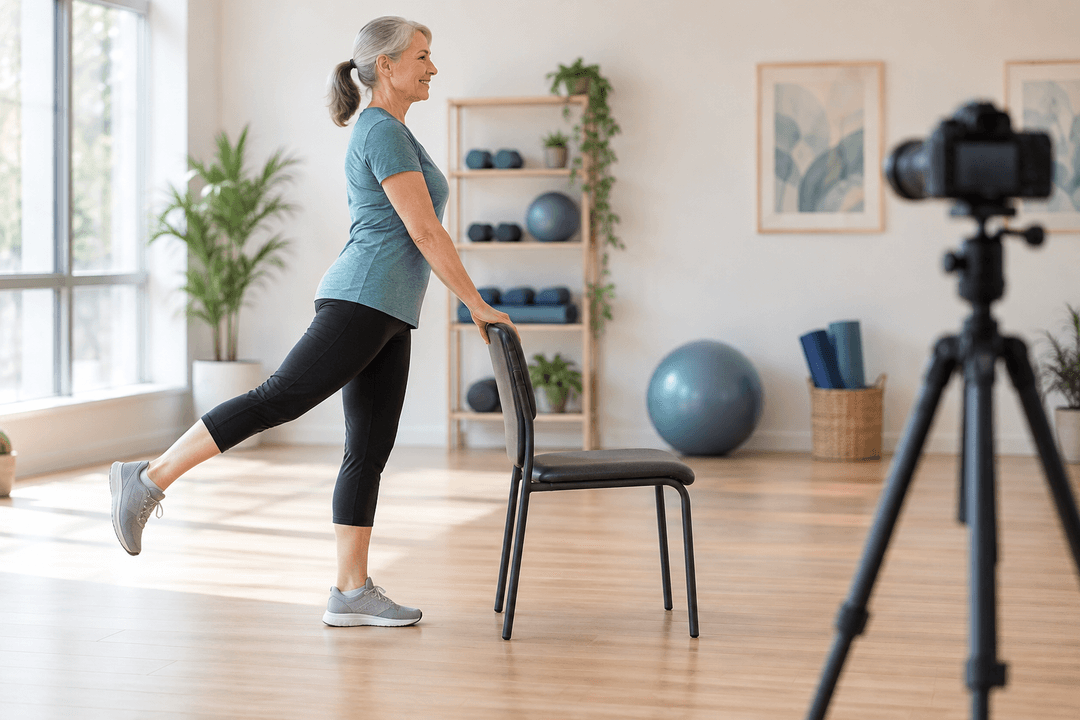
Senior exercise video production works when your clinical team owns the program and the studio owns how it reaches the screen. The handoffs that decide followability are a timed run of show, casting and camera framing, captions and audio for a shared-room TV, a clinician rough-cut review, a clear rights model, and a production request with six answers. Every clinical decision stays with your care team.
Your clinical team owns the program, and the studio owns how it reaches the screen
In clinician-designed exercise video production, your clinical team owns every decision about what a viewer does with their body, and the production studio owns every decision about how that instruction is filmed and delivered. Writing that split into the scope before the first call keeps the approved program intact on screen.
Your care team's column holds the movements, the progressions, the contraindication and stop notes, any cue wording that carries clinical meaning, and final sign-off. Our column at Fitscope holds casting, set, camera plan, filming, editing, motion graphics, captions, QA, and delivery. Program design is part of our fitness video production services for general fitness content, and in a clinician-designed engagement we hand it back to you on purpose. We contribute production structure (timing, segmenting, cue placement, camera angles) and never movement selection or dosage. Most filming guides assume one trainer writes, demonstrates, films, and edits, so they never address this handoff at all.
Naming an owner for each decision keeps the rough-cut review short, because every note already has an addressee. When the studio edits for pace, it cannot trim a clinical instruction to save four seconds. Anything that changes what a viewer does with their body goes back to your clinical team.
A clinician script becomes a timed run of show before anyone steps on set
A run of show is the production document that turns each line of your clinician script into timed, filmable segments both teams can read before the shoot. Take one script line: a supported sit-to-stand, with the reps, hold, and rest your clinicians prescribed.
That single line becomes five columns. The setup cue tells the viewer where the chair goes, how close the counter or rail sits, and where the feet land. The demonstration shows one full repetition at the pace the instructor will use. The follow-along block is timed to your prescription, so the reps, holds, and rest periods become seconds on a clock instead of an instructor's estimate. The modification column holds the seated or supported track, with its own timing. The transition column covers the reset into the next movement, including any chair repositioning. Pacing is decided here, on paper, where changing it costs a sentence instead of a reshoot. The storyboard and shot list follow from these columns, and the run of show doubles as the master exercise list, so similar setups can be filmed back to back.
Each segment carries a timestamp in the finished video, which lets staff and viewers jump straight to one movement. For overall length, a tutorial in JMIR Medical Education suggests 6 to 15 minutes per video as a general benchmark for educational content. Treat that range as a starting point your clinical team adjusts, and set session length in the production request.
Many programs pair the video with a printable companion sheet. Your clinical team writes the content, and we format it to match the classes.
Followability is a production spec a clinician can check on a rough cut
Followability in senior exercise video production comes down to casting, framing, setup, and audio choices that a clinician can verify on a rough cut. Older adults already use video classes. In a mixed-methods study of adults 60 and older, real-time virtual classes were the most common remote exercise support (44% of respondents), and 92% of those users rated live online classes moderately or very effective for staying active at home, which is a self-reported rating from one study. Research in older adults with mild cognitive impairment has also examined live online sessions, a result from one specific population. Neither finding speaks to any particular program's results. Both show that this audience turns up, so the open question is whether viewers can follow the class correctly.
Cast instructors who cue before the movement and teach the seated option as a full class
Casting for an older or clinical audience is a talent curation brief, and we fill it against criteria your team can audit on the rough cut. The instructor gives the verbal cue before the demonstration starts, so the viewer hears the instruction while still and then watches the move. Wording stays slow and plain, and the cue text matches your approved script. On camera, the instructor stays calm through holds and transitions. Our coaching is built around form, pacing, and progression, with inclusive language such as "start where you are," and for this audience upbeat means warm and unhurried. Seated and supported options are demonstrated for the full set, every rep, on screen. For many programs we recommend a second demonstrator dedicated to the seated track, shown alongside the main instructor. If your team wants a demonstrator closer to your residents' or patients' age or experience, that is a casting brief you write and we fill.
A seated option shown for two seconds tells the seated viewer they are an afterthought.
Keep the support point, the whole body, and the starting position in frame
Camera framing for older viewers starts with the support point. The chair, counter, or rail stays visible for the whole movement, because a viewer who cannot see what the instructor is holding will improvise. A full-body wide shot is the default, with the same background and wardrobe from class to class.
Angle choice follows the movement. Sit-to-stands, hip hinges, and anything where timing matters are filmed from the side, where the viewer can see when the hips move relative to the knees. Alignment work, such as foot width or knee tracking, is filmed from the front. Every movement opens on its setup (foot position, grip, chair placement), held long enough for a viewer to copy it before rep one. Programs that use a recumbent bike or treadmill start the camera plan with the machine, since our classes are built for real equipment across cycling, treadmill, and walking formats. If the equipment supports Bluetooth FTMS, the standard that lets fitness equipment share data such as cadence or speed with an app, the instructor can call targets the screen actually shows. Compatibility varies by device, so we confirm what your hardware reports before anyone writes a cue.
Gear takes one sentence. Any current camera on a tripod, in landscape, evenly lit, with a lapel mic on the instructor, will do. A visible chair and an early cue matter more to this audience than 4K resolution.
Music sits under the cue or comes out of the mix
In a clinical exercise class, the narration is the instruction. The JMIR Medical Education tutorial notes that music and background noise add cognitive load, while many trainer guides recommend tempo-driven tracks built for a younger, faster viewer. If music stays, it is licensed, quiet, and sits well under the voice.
The same tutorial cites 185 to 254 words per minute as a preferable narration pace, a figure measured for medical-student video and never tested on older adults. Set the pace by watching the rough cut with your clinicians, then adjust.
Captions, type size, and audio are set for the shared-room TV, not a phone
Captions, on-screen type, and audio levels in senior exercise video should be specified for the screen where the classes actually play, which is often a wall-mounted TV in a shared room. In a typical senior living activity room, residents sit at different distances from the screen, a few wear hearing aids, and a staff member starts the class with a remote. A class mixed for earbuds and a phone at arm's length struggles in that room, and the fix is a mixing decision made before delivery.
Caption files are a separate deliverable, checked word for word against the script during review, so a facility can switch them on or off by screen. On-screen text uses large, high-contrast type readable from the back of the room and stays up long enough to read twice. The edit holds steady pacing, with no fast cuts or flashy transitions between movements. The audio mix keeps narration forward and music low or absent, with levels consistent from segment to segment, so staff are not riding the volume between exercises. Each of these specs goes into the scope as a line item your team can check.
Delivery formats follow the audience. Typical options include streaming to in-facility displays, downloadable files, unlisted playlists, and offline copies for residents or patients without reliable streaming. Offline channels still matter here, and some curated, condition-specific exercise video lists still sell DVDs.
Classes on a shared facility screen need commercial terms instead of a consumer subscription, and that applies to senior living and active aging communities as much as to gyms. Confirm the licensing model for each screen before launch.
Clinicians approve cueing on the rough cut, before anything is final
Clinicians approve cueing accuracy on the rough cut, because that is the last point where a mis-cued movement costs an edit instead of a reshoot. The sequence runs from rough cut, to clinician notes against timestamps in one shared document, to a revised cut, to final approval. One named approver on your side consolidates the clinical notes, so the editor never has to resolve two conflicting comments. Stop and safety notes go exactly where the script places them, since the JMIR Medical Education tutorial reports studies finding that 10% to 40% of medical videos on YouTube were missing important safety information, a figure drawn from public uploads. The clinician rough-cut checklist is short:
- Cue wording matches the approved script. Any paraphrase the instructor improvised on set is flagged with its timestamp.
- Rep, hold, and rest timing match the prescription. The follow-along block should run the same seconds the run of show specified.
- Seated and supported modifications are shown in full. The modification track runs for the whole set, with no cutaways that hide it.
- Stop and safety notes appear on screen and in narration where the script puts them. Moving a note to a different segment counts as a change your clinicians approve.
- Captions match narration word for word. Clinical terms, counts, and side instructions (left and right) get a second read.
- Pacing gives a viewer time to reach the start position before rep one. If the setup hold feels rushed at viewing distance, it gets longer.
Our studio runs its own QA pass before the rough cut reaches your clinicians, so their review time goes to clinical accuracy.
Work for hire and licensed library content give you different rights to similar footage
In a work for hire production, the commissioning client typically negotiates control of the finished program, while licensed library content stays with the licensor and is used under agreed terms. Either way, the contract confirms who holds what. This is general information, not legal advice; your counsel and our team settle the specifics.
Can you edit or re-cut the footage later? With commissioned work, editing rights are usually part of the negotiation, so name any future re-cuts, translations, or shorter versions in the scope. With licensed library content, edits depend on the license terms.
Can you use the classes on more than one site or screen? Usage across locations, apps, and in-room televisions is defined in the agreement for both models. List every screen and site you expect, including future ones, so the terms match how residents or patients will actually watch.
Who handles consent if residents or patients appear on camera? Your compliance team determines the consent and privacy requirements, and we build the shoot around them. Because we offer both commissioning and licensing, we have no reason to steer you; the right model depends on whether you need to own a clinician-specific program or need breadth around it.
A senior exercise video production request needs six answers before the first call
A senior exercise video production request that answers six questions lets a studio scope the work on the first call instead of the third.
- Who is watching, and where? An activity room TV, in-room televisions, and home devices each change captions, type size, and the audio mix.
- How many sessions, and how long is each? Session count and length drive shoot days, editing hours, and the number of review files.
- Which equipment and support props appear on screen? Name the chair, counter, bands, recumbent bike, or treadmill, so the camera plan starts with them.
- Which delivery formats and displays do you need? Streaming, downloads, offline copies, and caption files are separate deliverables.
- What is the review timeline, and who are the named approvers? State who signs off and how many working days clinical notes take to come back.
- Which rights model and accessibility requirements apply? Say whether the series is commissioned or licensed, and list caption and on-screen text needs.
The request leaves two things out on purpose. Clinical rationale stays inside your team, and pricing and detailed terms come back to you as a quote. Requests most often under-specify the review side, and the approvers and their turnaround shape the schedule more than shoot days do. Send the six answers, and the first call can start with the schedule.
What care teams ask before commissioning a clinical exercise video series
Care teams commissioning a clinical exercise video series usually ask about timelines, review rounds, library supplements, instructor technique, and software.
How long does a custom exercise video project typically take?
Most of the time goes into editing and review, with filming a small share. In a tutorial on educator-made video, one academic team reported that producing a single short video took far longer than the common "hour per minute" heuristic, with editing and revising taking the largest share of the hours, though it describes educators producing their own video. Your timeline depends on session count, review turnaround, and any reshoots.
How many review rounds should we plan for?
Plan for at least a rough-cut round and a final-approval round. Add rounds when several clinicians sign off, and agree the number in the scope so revisions are planned instead of discovered.
Can existing library classes supplement a custom program?
Often, yes. Licensed classes in formats such as walking, recovery, and cardio-machine sessions can add general conditioning alongside the clinician-specific series. Your clinical team reviews any supplementary class before residents or patients see it, and classes on shared screens need commercial terms.
What can instructors do to make exercise videos an effective training tool?
Instructors preview the movement, cue before they demonstrate, and recap at the end. Segmenting by exercise with timestamps lets a viewer return to one movement. Repeated watching can create what researchers Kardas and O'Brien call an illusion of skill acquisition, so pair the video with real practice and the printable companion sheet.
What is the best program to create training videos?
The right tool depends on the job. A phone and a simple editor suit single-clip demos, while a captioned, multi-session clinical program needs a multi-camera studio workflow and an editor who manages caption files and timestamped review notes. AI-generated demonstrations still need clinician review of every movement, since vendors assert form accuracy without showing it. The tool matters less than the review process.
About Fitscope: the studio side of your clinical program
Fitscope is a connected-fitness content studio and platform built around equipment-based workouts. Your clinical team owns the program, and we manage production end to end, from casting and filming through captions, QA, and delivery, so you can release a finished series without building an in-house studio team.
Our production studio coaches around form, pacing, and progression, and our classes stream to in-facility displays in shared rooms. We offer both custom production and library licensing, so the rights choice stays yours and the delivery format follows where your residents or patients watch.
When your program is approved and the six answers are ready, talk to our team about scope and schedule.
Fitscope provides general fitness content for educational and entertainment purposes and does not provide medical, legal, or professional advice. Always consult a qualified professional before beginning a new exercise program. Results vary and workouts should be modified to your ability and comfort level.

Commercial Subscription
Allows Fitscope classes to be used in a commercial gym or boutique studio (1 location) with up to 500 members. Multiple simultaneous users enabled. Lets Talk!
© Fitscope Technologies LLC, 2023
Powered by  Fitcaster